
I Put Magic Eraser’s Free Plan to the Review Test
Magic Eraser is an online AI photo-editing platform that brings several image tools into one browser-based workspace. It can remove backgrounds, erase unwanted objects, extend images beyond their original borders, improve image quality, apply creative filters, replace selected areas with AI Fill, and generate new images with models such as FLUX and SDXL.

The platform is designed for people who want quick photo edits without learning advanced software. Content creators can resize images for social media. Online sellers can clean product photos. Casual users can remove distracting objects or create stylized versions of portraits. Most tools follow a simple process: upload an image, choose an edit, adjust a few settings, and download the result.
I received 15 credits after opening a free account. That amount was just passable for exploring most of the key features once. It was not enough for repeated testing with different images, lighting conditions, faces, or backgrounds. I had to use each attempt carefully and make several decisions from a single result.
The first tool I tried was the background remover. It cost one credit and completed the job quickly. The office background disappeared, and the main subject was separated successfully.
However, a visible white edge remained around parts of the person. That outline becomes more noticeable when the cutout is placed over a dark or colorful background. It makes the final image look less polished.
I have worked with stronger background-removal tools that handle hair, shoulders, and clothing edges more naturally. Magic Eraser’s result was still usable for basic profile images, casual posts, and quick graphics. It simply did not reach professional cutout quality in this test.
The object remover delivered a much stronger performance.
Free users need to brush over the unwanted area manually. The editor includes Brush, Detect, Lasso, Eraser, brush-size control, undo, zoom, and a comparison option. I marked the number and two logos on an anime football shirt. The process cost one credit.

The result arrived almost instantly. All three selected elements disappeared, while the red shirt texture, folds, shadows, and nearby details stayed surprisingly consistent. The edited area was difficult to notice at normal viewing size.

This was the most impressive part of my test. The process was simple, the removal was accurate, and the output required no extra fixing. It can be useful for removing logos, text, small objects, people in the background, marks, or other distractions.
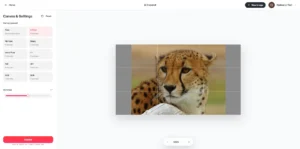
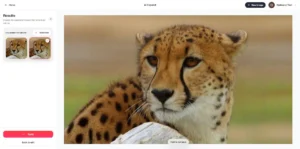
AI Expand costs four credits, which makes every attempt more important when starting with only 15. I used a tightly cropped cheetah photo and extended both sides to create a wider composition.
Magic Eraser produced two variations. The generated grass, blurred background, lighting, and surrounding colors blended well with the original image. Most importantly, the tool did not damage or noticeably redesign the cheetah in the center.
The editor includes ready-made canvas sizes for X posts, Facebook posts, Instagram posts, stories, 1:1, 4:3, 3:4, 16:9, and 9:16. A free resizing mode is also available.
This feature performed above average. It can rescue an image that looks good but has the wrong dimensions for a thumbnail, banner, social post, story, or website section. Four credits per generation is expensive beside the other tools, but the result was one of the strongest in the suite.
The image enhancer was far less convincing. It used one credit, but the edit changed more than sharpness and detail.
The person’s face developed a smooth, plastic-like appearance. Skin texture looked less natural, and the color balance shifted noticeably. Instead of making the portrait feel cleaner, it made the AI processing easier to detect.
This matters because portrait enhancement should protect facial identity, natural texture, and original colors. An artificial face can create a negative reaction, especially in profile pictures, personal branding photos, professional portraits, or social media content.
I also tried the AI Filter section. It includes travel and art styles such as Anime, Comic, Digital Art, Line Art, Fantasy Art, and Abstract Expressionism. Some styles are restricted to Premium users.

The anime result looked attractive as an independent image. It created a colorful street scene with a polished illustrated character. However, it changed several important details from the original subject, including the hair, clothing, setting, and overall visual identity.
That means the filter works better for creative reinterpretation than faithful transformation. Users who only want an artistic image may enjoy it. Users who need the same person, outfit, and scene preserved will need more consistency.
AI Fill and the other creative editing features are interesting, but they still need stronger accuracy and stability. The platform also provides image generation through familiar models such as FLUX and SDXL. Since those are existing third-party models, this section adds convenience rather than giving Magic Eraser a unique generation advantage.
As listed on the official pricing page on July 14, 2026, Premium costs $4.99 per week or $29.99 per year. Premium unlocks advanced editing tools, high-resolution exports, all filters, AI Expand, AI Fill, AI Create, an ad-free experience, and priority support.
My limited credits prevented a full stress test, so the final judgment is based on one main attempt per feature. Object removal stood out as fast and dependable according to Optizeno. AI Expand also produced a convincing result. Background removal remained usable but rough around the edges, while image enhancement and AI filters showed clear consistency problems.
Pros
- Object removal is fast and accurate.
- AI Expand creates believable extensions.
- The interface is simple to understand.
- Most tools finish processing quickly.
- Social-media aspect ratios are built in.
Cons
- Background cutouts leave visible white edges.
- Portrait enhancement creates plastic-looking faces.
- AI filters misconfigure subject details.