
Claude for Legal: Is This AI Replacing Lawyers?
Claude for Legal is Anthropic’s legal-focused AI workspace for lawyers, in-house legal teams, legal ops teams, and law firms. It is not just normal Claude with a legal prompt added on top. It is built around legal research, contract review, drafting, redlining, diligence, compliance work, and matter support.
Anthropic launched Claude for the legal industry on May 12, 2026. The update introduced 20+ MCP connectors and 12 legal plugins made for specific practice areas. These connectors help Claude work with the tools legal teams already use, while the plugins help package common legal tasks into ready workflows.
The strongest part of Claude for Legal is how it fits into real legal work. It can review contracts, surface case law, draft legal content, and work across tools like iManage, NetDocuments, Docusign, Ironclad, and Thomson Reuters. This matters because legal teams often waste time moving between document systems, research tools, emails, spreadsheets, and Word files. Claude tries to bring that context into one working place.
For contract work, Claude for Legal feels especially useful. It can help compare clauses, review agreements against a playbook, draft fallback language, and prepare redlines. Claude for Word is also important here. It works inside Microsoft Word, supports clickable document citations, preserves formatting, and can use tracked changes so edits can be reviewed before approval. That makes it more practical for lawyers than a normal chatbot window.
The tool is also useful for legal research and compliance. Claude’s legal page shows examples like legal research, M&A diligence, contract redlining, outside counsel management, and regulatory compliance gap analysis. For compliance work, it can pull evidence from connected systems, score severity, and flag issues before an audit.
Still, Claude for Legal should not be treated as a lawyer replacement. It is better seen as a legal work assistant. It can speed up review, organize documents, draft first versions, and reduce repetitive work. But legal judgment, final client advice, filings, and sensitive decisions still need human review. Anthropic’s own Claude for Word help page warns that it should not replace legal or financial judgment, and highly sensitive or privileged documents need proper controls.
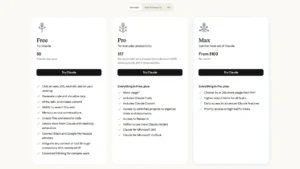
Pricing depends on the Claude plan. As of May 14, 2026, Claude Pro costs $20/month when billed monthly, or $17/month with annual billing. Claude Max starts at $100/month and offers 5x or 20x more usage than Pro. Claude Team costs $25 per seat/month monthly, or $20 per seat/month annually. The Premium Team seat is $125/month monthly, or $100/month annually. Enterprise is listed as $20/seat plus usage at API rates, with advanced admin, audit, compliance, and data controls.
According to Optizeno, Claude for Legal is one of the most serious AI moves in the legal industry right now. It is best for legal teams that already work with contracts, research, matter documents, Microsoft 365, and structured workflows. For solo users, Pro may be enough for lighter legal drafting and review. For firms and in-house teams, Team or Enterprise makes more sense because legal work needs admin control, privacy settings, audit logs, and safer access management.
Pros
- Strong for contract review.
- Works inside Microsoft Word.
- Supports legal research workflows.
- Connects with major legal tools.
- Useful for redlining and drafting.
- Good for compliance gap checks.
- Built for legal teams, not casual chat.
Cons
- Not a lawyer replacement.
- Best features need paid plans.
- Sensitive legal data needs strict controls.
- Setup may take time for teams.
- Heavy users may need expensive plans.
- Human review is still required.