
Yansu Review: Can It Build Apps Before You Ask?
What Makes Yansu a Game-Changer?
Yansu claims to be an AI tool that observes your workflow and creates personalized software before you even know you need it. Naturally, I was curious to see if it could deliver on this promise. After setting it up on my Windows PC, I let Yansu quietly observe my daily tasks—managing emails, updating trackers, and filling out forms. There were no interruptions or unnecessary pop-ups. It analyzed my habits, choices, and subtle pauses to build what it calls “tribal knowledge.” This knowledge forms the base for the apps it generates.
In just a few days, Yansu noticed I was repeatedly moving customer requests from Slack into a spreadsheet and updating their progress. I thought it would take weeks to teach it, but Yansu surprised me. It quickly created a simple dashboard that tracked requests directly from Slack, assigning each its own column for updates. There was no coding, no complicated setup—just a functional dashboard ready to use on my desktop.
I was amazed at how quickly it turned my routine into a practical tool. According to Yansu’s website, it works with desktop activity and messaging platforms like Slack, Teams, Discord, and WhatsApp. My experience confirmed this. Once you give it access, it identifies patterns in your files and conversations effortlessly.
Behind the Scenes: Yansu’s AI in Action
Yansu operates with a virtual cursor that works quietly in the background. It can open apps, fill forms, and handle tasks like filing tickets—all without taking over your mouse. During my testing, my cursor never behaved erratically or moved unexpectedly. When browser interaction was needed, Yansu relied on its own hidden pointer. This thoughtful approach prioritizes privacy. The company asserts that your data remains local and only leaves your device with explicit consent. This claim held true during my test: all generated dashboards and files were stored securely on my Windows computer. A settings panel provided options to disable certain data sources or delete stored information. Yansu is also certified with SOC 2 Type II and ISO 27001 standards, offering added assurance for businesses concerned about compliance.
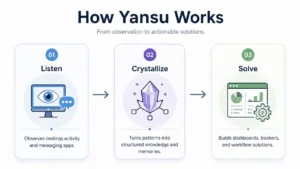
The process of transforming repetitive tasks into apps involved three intuitive steps. First, Yansu observed my actions, including screenshots and chat activity. Next, it analyzed these inputs, identifying patterns and structuring them into actionable insights. Finally, it created solutions, like workflows or dashboards, tailored to my needs. This extends beyond simple macro recording. Yansu uses advanced AI models—like those from Anthropic, OpenAI, and Google—to understand and respond to the task at hand. During the analysis phase, I received a concise summary of my actions, which I could review or adjust before the tool generated the final app. This collaborative process felt essential, reducing the risk of automating errors.
Compatibility and User Experience
Yansu is compatible with macOS, Windows 10+, and Linux. It connects effortlessly with popular platforms like Slack, Microsoft Teams, Feishu, Discord, Telegram, WhatsApp, and WeChat. During my testing, the Slack integration worked flawlessly. Once synced, Yansu could monitor incoming messages and instantly assign tasks in the customized dashboard it generated. There’s no coding required. Just focus on your work, and Yansu quietly develops the tool in the background.
One standout feature is the invisible pointer. Yansu’s system operates independently of your mouse, ensuring smooth operation. My workflow never felt disrupted, and windows remained steady as tasks were handled discreetly. This thoughtful design enhances usability and ensures a seamless experience—a rare quality in many emerging AI tools.
Affordable Plans for Every User

As of May 30 2026, Yansu offers a free plan that includes two full app completions, workflows, and stored activities per month. The Pro plan costs $20 monthly, providing approximately five app completions, workflows, and fifty stored activities. The Studio plan is priced at $100 per month, offering up to 25 app completions and 250 stored activities. For higher needs, the Max plan costs $200 monthly, allowing up to fifty app completions and stored activities. The Enterprise plan provides tailored options for larger teams and specific requirements.
In my free‑tier test, I quickly hit the two‑app completion limit after generating a task tracker and weekly overview. This meant I couldn’t create more until the next billing cycle. While the free plan feels limited for heavy users, upgrading unlocks much more flexibility and higher output. Yansu’s pricing structure may feel constrained for some, but the enhanced capabilities of the paid plans make it a worthwhile investment for frequent users.
Who Can Make the Most of Yansu
Yansu is perfect for professionals, small teams, and entrepreneurs who deal with repetitive tasks across multiple tools. If your routine includes updating spreadsheets, managing support tickets, or summarizing meetings, Yansu can streamline your workload by building tailored internal tools and dashboards. It removes the need for manual setups or complex platforms by analyzing your processes with precision. This makes it a great choice for non-technical users eager to automate tasks without spending hours configuring tools like Zapier or coding custom scripts.
So Optizeno Final Verdict is, Yansu is still in its early access stage. While I successfully built two working tools, the third attempt failed due to a misstep in interpreting my actions. The range of integrations is also limited—key tools like Google Drive and Microsoft 365 aren’t supported yet. Additionally, the free plan’s storage cap can feel tight, especially during high-activity periods. However, the concept is promising, and the development team appears committed to rapid improvement.
Pros
- Learns workflows and builds apps proactively.
- Runs a separate virtual cursor so it never steals control.
- Local‑first design keeps your data on your machine.
- Supports macOS, Windows and Linux with multiple chat integrations.
- SOC 2 Type II and ISO 27001 certified security.
Cons
- Still in beta; occasional misinterpretations and bugs.
- Limited integrations (no direct Google Drive/Microsoft 365 yet).
- Requires full access to messaging apps and desktop activity which may feel intrusive.